About the Warm Cream resume design
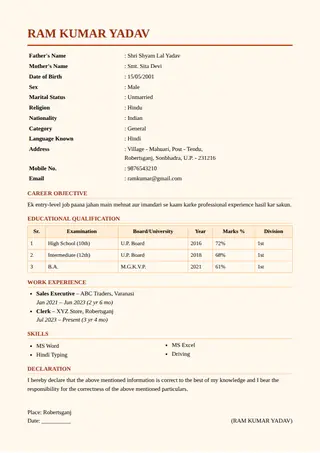
Warm Cream uses a soft cream page, rust-orange headings and double borders on biodata and project pages, giving a warm, traditional feel.
This page opens the builder with the Warm Cream design selected, so you can type your own details and watch them fill the layout. All 36 designs are available in the design box and your text is kept when you switch. Compare them on the resume templates page.
Who the Warm Cream design suits
- Teachers, writers and traditional professions
- Marriage biodata and formal documents
- Candidates who like a warm tone
When to choose another design
If the Warm Cream layout does not fit your job, try a plainer option from the ATS template guide or a bolder one from the modern template page.
- Corporate and technology roles
- Black-and-white printing, where the cream tone disappears
Design details
| Feature | In this design |
|---|---|
| Structure | Decorative elements, best for human readers |
| Photo | Works with or without a passport photo |
| Length | Built for one A4 page |
| Colours | Seven accent colours, changeable at any time |
| Other documents | The same design also applies to biodata and project front pages |
How to get the best result with Warm Cream
Print in colour on good paper. The cream background is part of the design and is lost in plain black-and-white copies.
Frequently asked questions
Does Warm Cream work for biodata?
Yes. The double border and warm colours are popular for marriage biodata.
Will the cream background print?
Yes, with background graphics turned on in the print dialog.
Can I download the Warm Cream template as a PDF?
Yes. Fill in your details, choose Print / PDF Save and pick Save as PDF. The file is created on your own device and no signup is needed.