About the Arrow Heads resume design
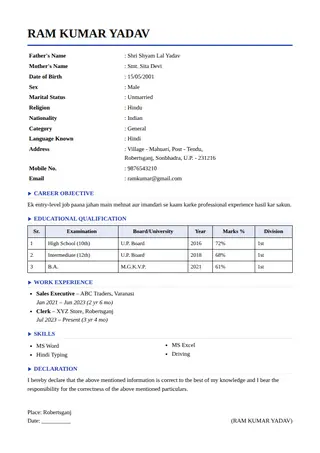
Arrow Heads adds a small triangle pointer before every section heading and a coloured rule under the name, guiding the eye down the page.
This page opens the builder with the Arrow Heads design selected, so you can type your own details and watch them fill the layout. All 36 designs are available in the design box and your text is kept when you switch. Compare them on the resume templates page.
Who the Arrow Heads design suits
- Operations, sales and administrative roles
- Resumes with clear step-by-step sections
- Candidates who want a subtle directional style
When to choose another design
If the Arrow Heads layout does not fit your job, try a plainer option from the ATS template guide or a bolder one from the modern template page.
- Formal government forms
- Highly decorative requirements
Design details
| Feature | In this design |
|---|---|
| Structure | Decorative elements, best for human readers |
| Photo | Works with or without a passport photo |
| Length | Built for one A4 page |
| Colours | Seven accent colours, changeable at any time |
| Other documents | The same design also applies to biodata and project front pages |
How to get the best result with Arrow Heads
The arrow takes the colour of the accent, so choose a colour that matches the rest of your branding or industry.
Frequently asked questions
Are the arrow pointers real text?
They are decorative shapes added by the design, so the text stays plain and readable by software.
Is Arrow Heads good for freshers?
Yes. The pointers make short sections easy to follow.
Can I download the Arrow Heads template as a PDF?
Yes. Fill in your details, choose Print / PDF Save and pick Save as PDF. The file is created on your own device and no signup is needed.